Showing posts with label Web Development. Show all posts

Monday, June 29, 2015

Install Jenkins in ububtu : Quick HowTo

Jenkins.. a very trendy continuous intergation tool. Everybody should give it a try. Specially if you have an ubuntu distribution, it's just the perfect match. All you need to do is to run those command lines step by step :

wget -q -O - http://pkg.jenkins-ci.org/debian/jenkins-ci.org.key | sudo apt-key add - 
sudo sh -c 'echo deb http://pkg.jenkins-ci.org/debian binary/ > /etc/apt/sources.list.d/jenkins.list'
sudo apt-get update
sudo apt-get install jenkins
export JENKINS_HOME=/opt/jenkins
That's it !! and you will have jenkis already running and available on your localhost (http://localhost:8080/).
You can start and stop Jenkins using these command lines :
sudo /etc/init.d/jenkins start
sudo /etc/init.d/jenkins stop

Saturday, April 11, 2015

How to fix org.apache.xmlbeans.XmlException: error: Unexpected character encountered (lex state 3)


I have encountred this error while trying to communicate with a webservice that returns in its XML a url containing a "&" character. While parsing the XML response my web server gives this error : "org.apache.xmlbeans.XmlException: error: Unexpected character encountered (lex state 3)".
The solution is to replace this character by "&" before parsing the XML response.

response = response.replaceAll("&", "& a m p ;"); 
That's all you need to do. It means that the xml document you're parsing isn't perfect.


Tuesday, March 31, 2015

Cannot enable Crtl+space shorcut for Content Assist in Eclipse for Ubuntu

Sometimes, some conflicts in keyboard shorcuts can drive you nuts ! After reading dozens of forum discussions about this subject. I have found the solution in this link.
 
Actually, you need to change the Ibus keyboard shorcut (control+space) so it doesn't "eat up" your magic shorcut on Eclipse.

Now you can go ahead and enjoy your programming !

Tuesday, September 14, 2010

Web-Desktop Application for Network Monitoring and Alert Management.


Currently, computer networks are the backbone in the remote communication. Now they have become essential for the proper functioning of many domains and applications. Their rapid growth induces increased complexity of administration tasks and fault detection. Any problems or failure may have serious consequences forcing the use a system of monitoring and alert management.

The network monitoring has become therefore a major task not only the ensure the system retention and good functionality but also to have a global view on problems that may occur to prevent their appearance. As the task of the administrator is to ensure the smooth functioning of its network and manage heterogeneous devices, administrators were then forced in the past to work on a machine connected to the network which makes their task more difficult and may risk delaying critical tasks. Thanks to advances in technology and the evolution of the Web, this monitoring task has become more flexible.

In fact, the administrator is now able to monitor its network remotely via a web application that provides network monitoring and is capable of describing its condition and report alerts when this is necessary. Hence, it can remedy problems and resolve them as quickly as possible.

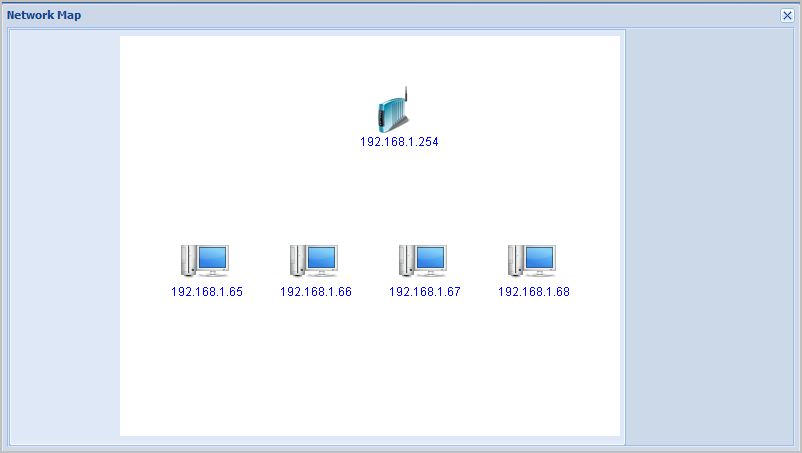
Indeed, this application starts with the automatic detection of network equipment (Routers, firewalls, terminal) which allows to draw the map showing equipment found to give the administrator a clear view on its network. The administrator can also predefine the annoying problems that which he judges to be important to be notified when they occur. Once one of these problems is encountered, an alert will reported to the administrator to inform him about the problem detected, its severity and its location so that he becomes able to correct it immediately.

The main objective of this project is to develop a web application for network monitoring and effective management of alerts. This application should be able to monitor services and network resources (routers, terminals). The following video is a demonstration of the project.